Booking emails become bookings
Forward your Booking.com, Expedia and SiteMinder emails and they turn into bookings by themselves within minutes – changes and cancellations too. No retyping, no double bookings.
A new booking in seconds
Click an empty box on the calendar: room, date and price are already filled in. Returning guests appear as you type their name, with their details ready.
Everything beside the calendar
The Side Panel opens any booking next to your calendar. Check details, take a payment, send an email or check a guest in – without losing your place.
Emails that send themselves
Pre-arrival information with the booking confirmation, payment reminders with the invoice and bank details, and a thank-you email with your Google review link – on time, from your own mailbox.
Check-in before they arrive
Send a link: guests confirm their details and sign on their phone. Today shows who is arriving, who still owes money and which rooms are ready.
The whole team on one screen
Cleaners update rooms on their phones and the front desk sees it straight away. Every staff member has their own login and PIN, on any device.
Calendar – the heart of NURISTAY
One row per room, one column per night. Change a stay by dragging it – with the mouse on a computer, or your finger on a phone or tablet – and NURISTAY works out the price for you.
- Drag to make a stay longer or shorter
Drag the right end of a booking. NURISTAY suggests the price change (nights × nightly rate) – add it, take it off or keep the price – and updates the payment status by itself.
- Drag to move a booking
Drag it sideways to other dates, or up and down to another room. A dotted box shows where it will land, and turns red if that room can’t be sold as the booking’s room type.
- Just as easy on a phone
Press and hold a booking until the dotted box appears, then drag with your finger. A quick swipe still scrolls, and a tap still opens the booking.
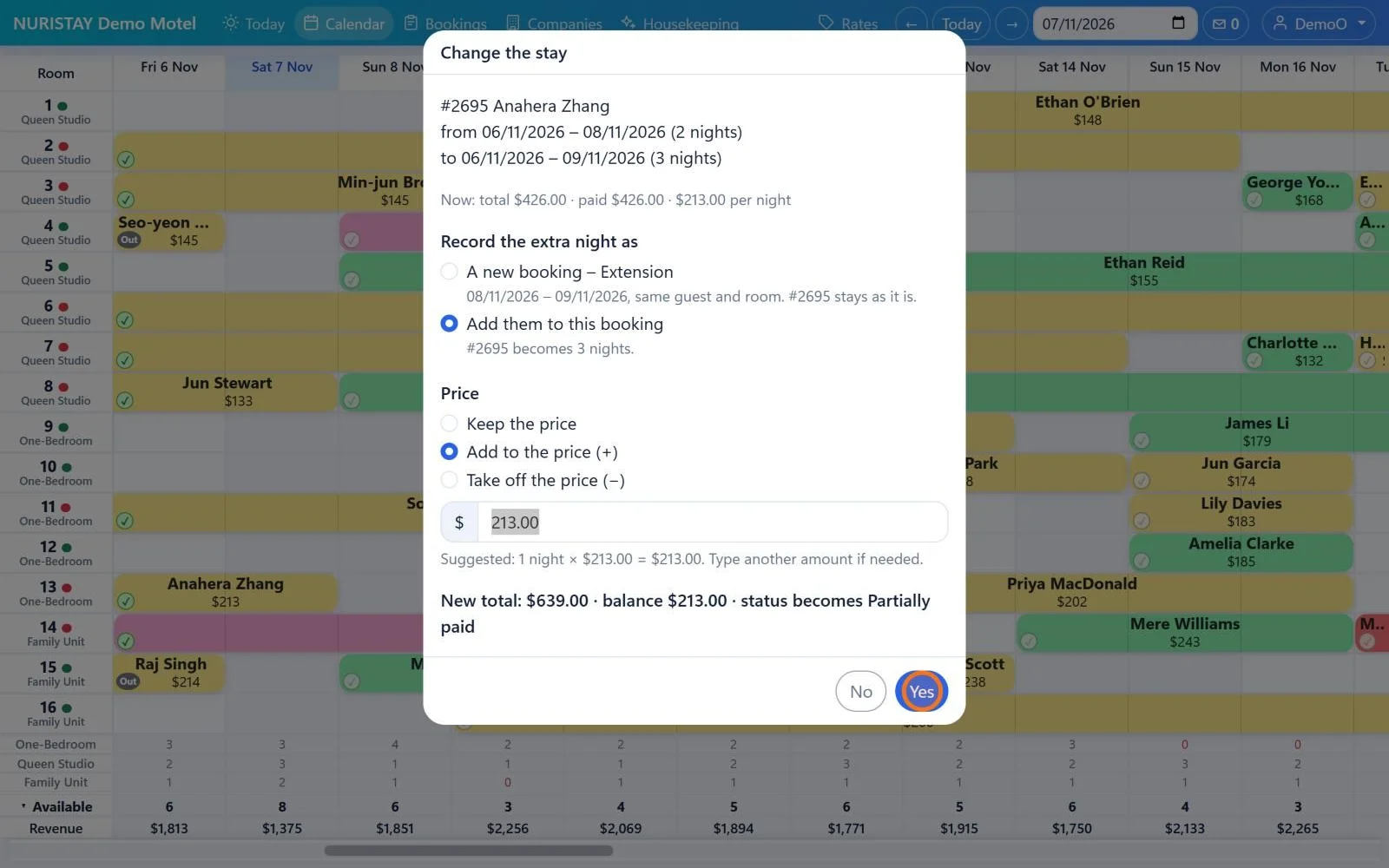

Moving picture: drag the right end one night longer – NURISTAY suggests +$213, and the stay becomes 3 nights and $639. Drag it back and the $213 comes off again.

Check-in – quick, and no paper
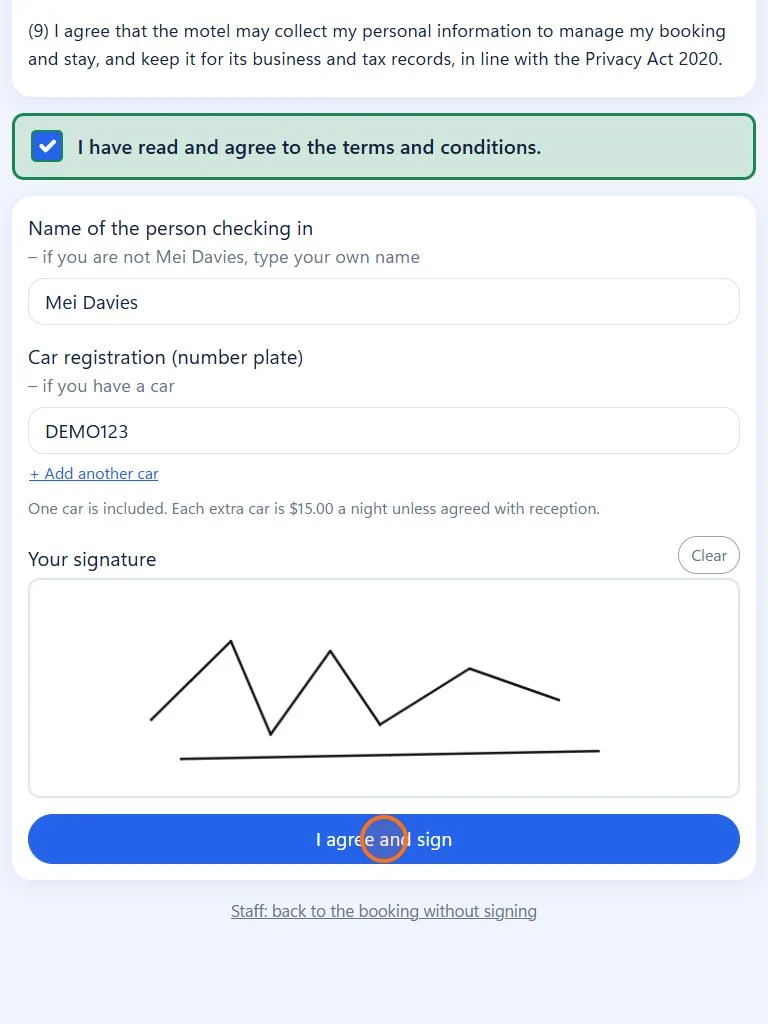
Guests check in online before they arrive, or sign the check-in form on your tablet at reception. Everything is saved with the booking in the cloud – nothing to print or file.
- Online check-in before arrival
Email or text the guest a link. They confirm their details, add photos of their ID and card if you ask, and sign on their own phone.
- Sign on a tablet at reception
Press Sign and hand over the tablet: a guest screen in large text, with no menu. The guest ticks the terms, adds their car and signs with a finger – from the check-in day this also checks them in.
- Paperless – kept in the cloud
Signed check-in and security deposit forms are saved with the booking and kept for 7 years. ID and card photos are encrypted and deleted 7 days after check-out.
A guest’s stay, start to finish
What NURISTAY does by itself at each step, and who does the rest – on which device.
- 1
The booking arrives
From a booking email, your booking page or a phone call. It goes straight onto the calendar.
Automatic - 2
Pre-arrival email
Two days before arrival: check-in times, the address and map, and the booking confirmation.
Automatic - 3
Online check-in
The guest confirms their details and signs on their phone before they arrive.
Guest’s phone - 4
Arrival
Today shows who is arriving and who still owes money. Check the guest in from the calendar.
Front desk - 5
Housekeeping
Cleaners press Start cleaning, then Done, and the front desk sees the room is ready.
Cleaner’s phone - 6
Thank-you email
After check-out, a thank-you email with your Google review link and a direct-booking discount.
Automatic
All you need is the internet
NURISTAY runs in the web browser, so you can use it on any computer, tablet or phone, anytime and anywhere – at the front desk, around the property or on holiday. Choose a device to see the same screens on it.
Two weeks of rooms on the calendar, with bookings opening beside it in the Side Panel. Install it from Edge or Chrome and it opens in its own window, with its own icon.
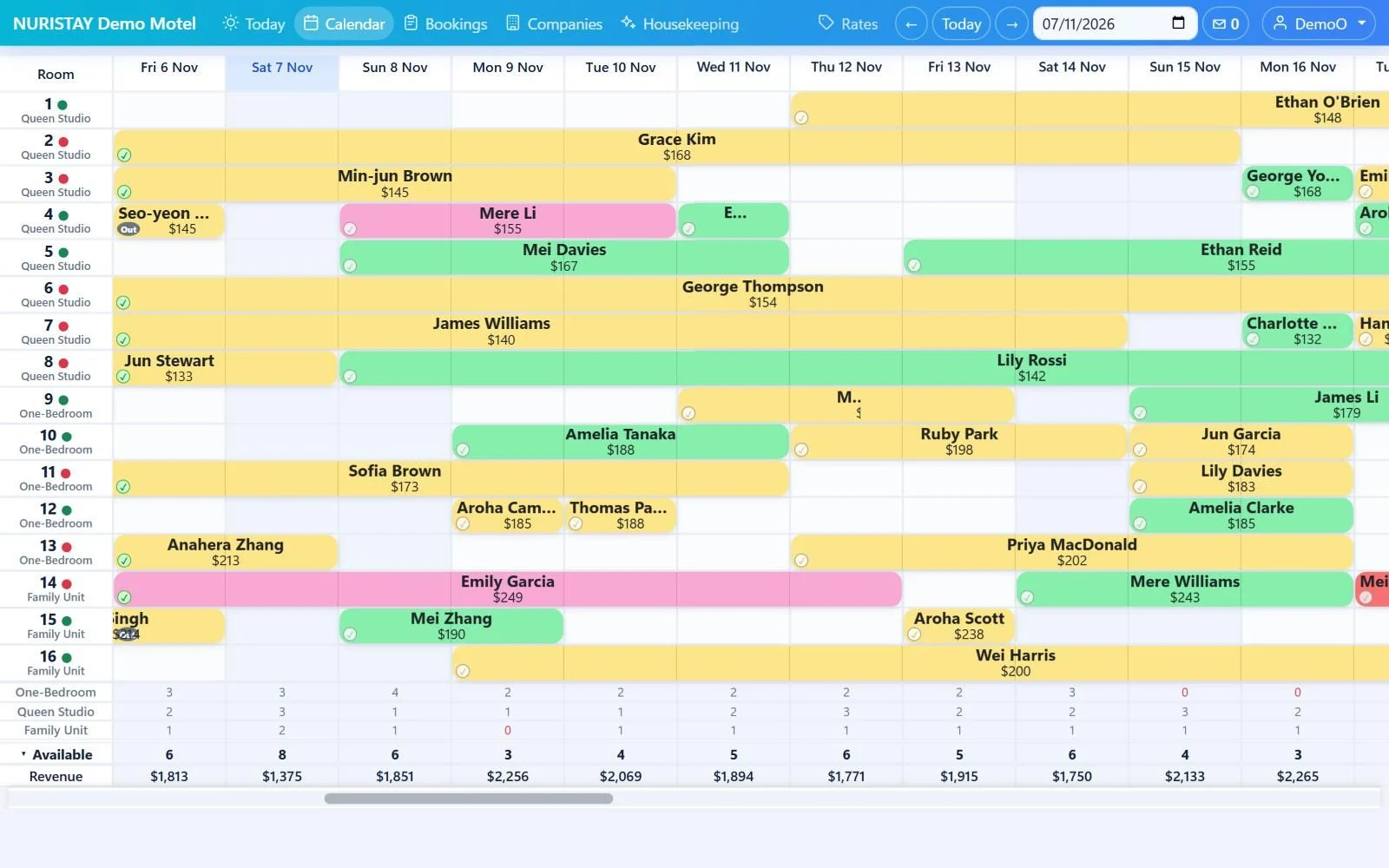
Real screens from NURISTAY Demo Motel, with made-up bookings. Each screen scrolls by itself to show the whole page – scroll it yourself to look around.
- Nothing to install
Open it in the web browser on a PC, laptop, iPhone, iPad or Android device. New versions arrive by themselves.
- Everyone sees the same
Screens refresh by themselves, so a room a cleaner finishes shows at the front desk within 15 seconds.
- Safe from anywhere
Everyone has their own login: a password, then a PIN. Your own phone or PC can remember you for 30 days.
- Kept in New Zealand
Your data is stored in New Zealand and backed up automatically. Owners can restore their property from a backup.
Run all your properties with one login
Run more than one property – motels, hotels or holiday parks? Each property has its own rooms, bookings, team and subscription, and you move between them with one login – no signing out and in again.
- 1. Tap the property name
The property you are working on is at the top left of every screen. Tap it to see all your properties.
- 2. Choose another property
The screen you were on – Today, Calendar, Bookings or Stats – switches straight to that property.
- 3. Everything stays separate
Every screen shows only the chosen property, so bookings, rooms and money never mix. Each team member sees only the properties they work at.
Practise without risk: at the bottom of the list, NURISTAY Demo Motel lets you try anything with made-up bookings, and one press brings you back.
Email work, done for you
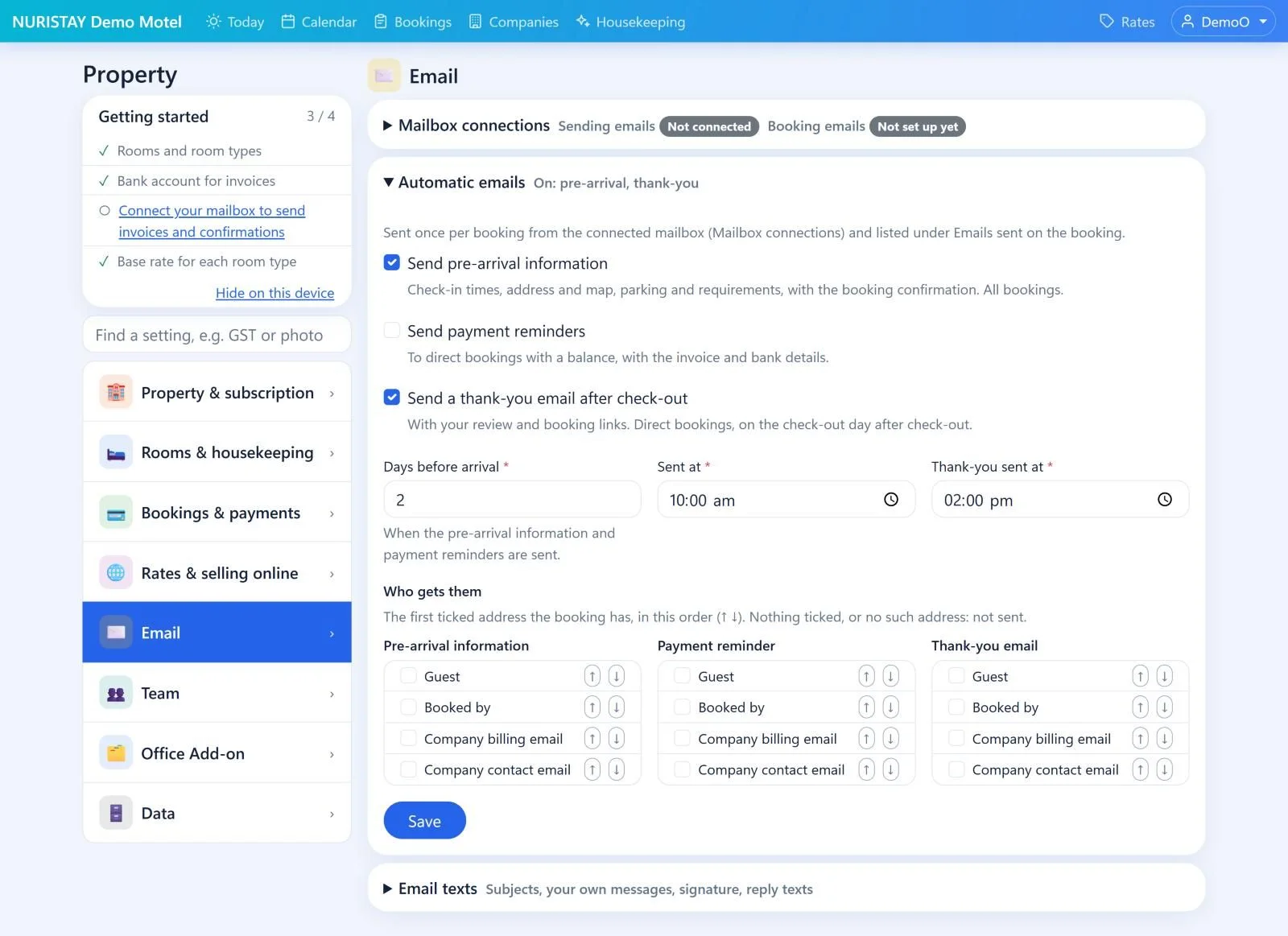
Connect your Microsoft 365 mailbox once. NURISTAY sends the right email at the right time and keeps a record on every booking.
- Booking emails from Booking.com, Expedia and SiteMinder become bookings by themselves – any email it is unsure about waits for you to check.
- Pre-arrival information two days before arrival, with check-in times, the address and map, and the booking confirmation.
- Payment reminders to direct bookings with a balance, with the invoice and your bank details.
- A thank-you email after check-out with your Google review link and a direct-booking discount.
- Invoices, receipts, booking confirmations and quotes emailed from the booking page in a couple of clicks.
- With the Office Add-on, the Inbox shows guest emails matched to their booking, with ready-made reply texts.
Built to grow your revenue
NURISTAY does more than record bookings. It helps you sell every room at the right price, keep more of each dollar and get paid sooner.
Price with the market
See what the 20 cheapest places to stay nearby charge every night, your rank and how prices moved. Price suggestions (▲ raise, ▼ lower) for the next 120 nights follow the market and your booking pace.
More direct bookings, less commission
Your own booking page takes bookings at 0% commission, confirmed straight away. Thank-you emails bring guests back with a direct-booking discount and ask for a Google review.
Never lose a night
When a guest leaves early, charge the early-departure fee from your cancellation policy and put the room back on sale with one press. Extra nights for OTA guests become your own Extension booking.
Get paid sooner
Automatic payment reminders, payment links and security deposits, and a list of virtual cards waiting to be charged. With the Office Add-on, company accounts show who owes what, and for how long.
Quotes that hold the room
A quote is a booking on hold, so no one else can take the room while the guest decides. When they say yes, it is already booked.
Know your numbers
Occupancy, ADR, RevPAR, and revenue and commission by channel – by week, month or quarter. Add the Office Add-on for a full-year revenue forecast.
Timesheets and payslips (Office Add-on)
Cleaners and staff clock in and out on their phone, so their hours are recorded as they work. Payslips are made from those hours.
- Clock in on a phone or with a door badge
- Hours in Timesheets
- Payslips made from the hours
- Emailed to staff, filed with IRD
Staff press Clock in on the Housekeeping screen, or send their hours under My timesheet. Gallagher door badges can come in by themselves.
Every shift lands in Timesheets, with rosters and an alert when someone forgets to clock in.
Payslips, hourly or salary, are made from the timesheet hours and emailed to staff – with leave and IRD payday filing.
Everything you need, in one place
Today & calendar
See arrivals, departures and in-house guests at a glance, and every room by date on the calendar.
Bookings
Create single and group bookings in seconds from your phone, tablet or computer, and keep a full history of changes.
Online booking page
Let guests book directly on your own website. The booking goes straight into your calendar.
Online check-in
Guests complete check-in before arrival. ID and card photos are encrypted and deleted 7 days after check-out.
Housekeeping
Cleaning tasks and checklists for every room, so you always know which rooms are ready.
Rates & channel manager
Seasonal and day-of-week rates, minimum stay and closing dates, kept in step with booking channels such as Booking.com and Expedia.
Documents & email
Tax invoices, receipts and quotes as PDFs, plus automatic pre-arrival, thank-you and payment reminder emails.
Payments
Send payment links and hold security deposits online through Stripe.
Stats
Understand occupancy and revenue with clear reports.
How NURISTAY fits together
Bookings from every channel land in one calendar. Your team works on any device, and the routine emails and paperwork happen by themselves.
Bookings come in
Forwarded booking emails become bookings by themselves – changes and cancellations too.
Guests book direct at 0% commission, confirmed straight away.
Click an empty box on the calendar and the booking is made in seconds.
 NURISTAY
One calendar and one guest list for the whole team
- Today
- Calendar
- Bookings
- Housekeeping
- Rates
- Stats
The channel manager keeps availability and rates in step with your booking channels
Your team, on any device
Calendar, check-ins and payments
Start cleaning, then Done – the room shows ready
Today, payments and stats, from anywhere
Online check-in on their phone, or sign on your tablet
Done for you
Pre-arrival, payment reminders and thank-you emails from your own mailbox
Tax invoices, receipts and quotes as PDFs in a couple of clicks
Payment links and security deposits through Stripe
Occupancy, ADR, RevPAR and revenue by channel
See how NURISTAY fits your property
Tell us about your property and we will show you around. The demo is free, with no obligation.