
Property management software (PMS) for New Zealand accommodationLess admin, more bookings. Run your property from anywhere.
Bookings, check-in, housekeeping and guest emails in one place, on any device – for every kind of New Zealand accommodation.
- Made by a family that has run a NZ motel for 20+ years
- We set it up for you
- Plans from $99 / month + GST
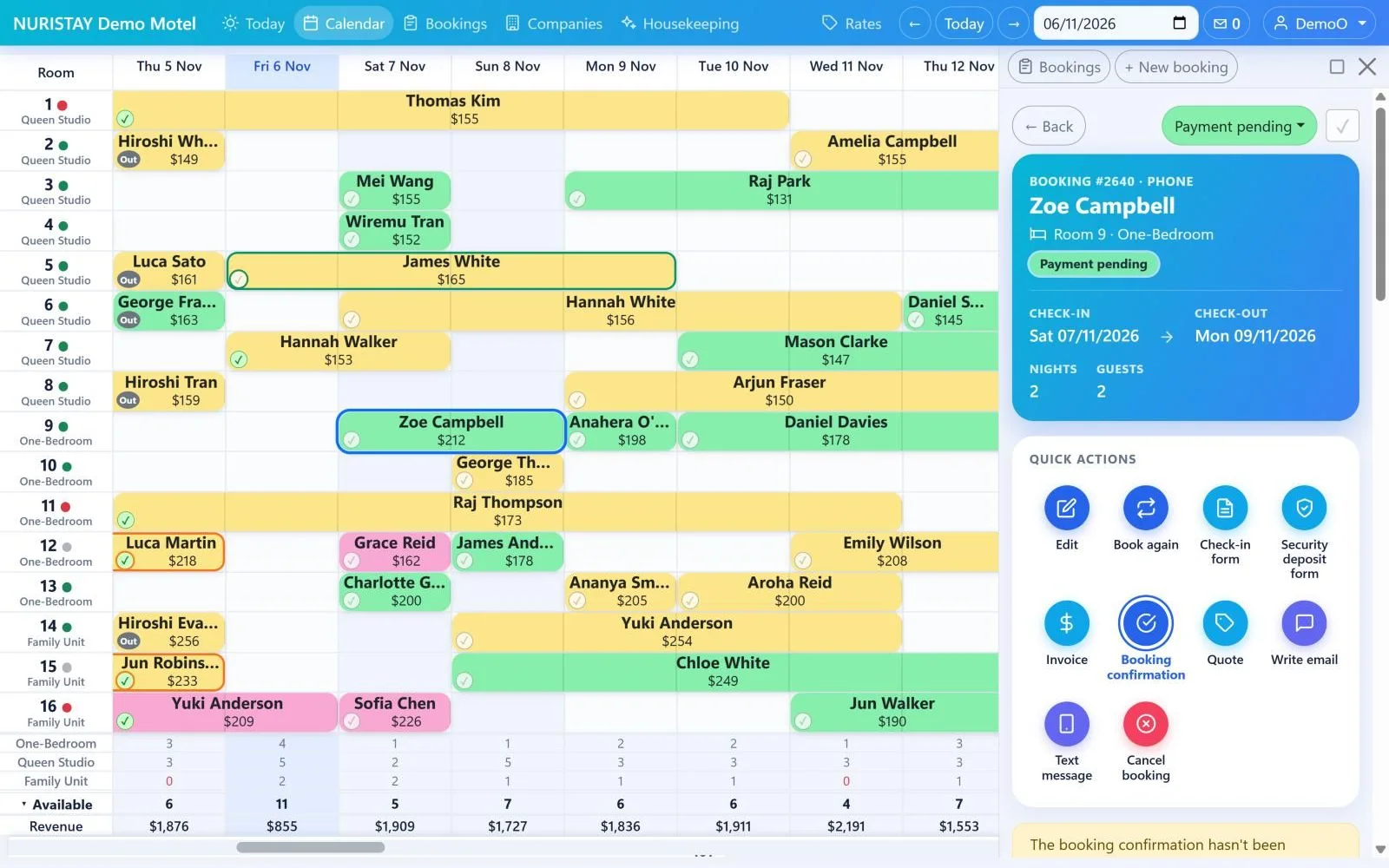
Calendar – the heart of NURISTAY
One row per room, one column per night. Change a stay by dragging it – with the mouse on a computer, or your finger on a phone or tablet – and NURISTAY works out the price for you.
- Drag to make a stay longer or shorter
Drag the right end of a booking. NURISTAY suggests the price change (nights × nightly rate) – add it, take it off or keep the price – and updates the payment status by itself.
- Drag to move a booking
Drag it sideways to other dates, or up and down to another room. A dotted box shows where it will land, and turns red if that room can’t be sold as the booking’s room type.
- Just as easy on a phone
Press and hold a booking until the dotted box appears, then drag with your finger. A quick swipe still scrolls, and a tap still opens the booking.
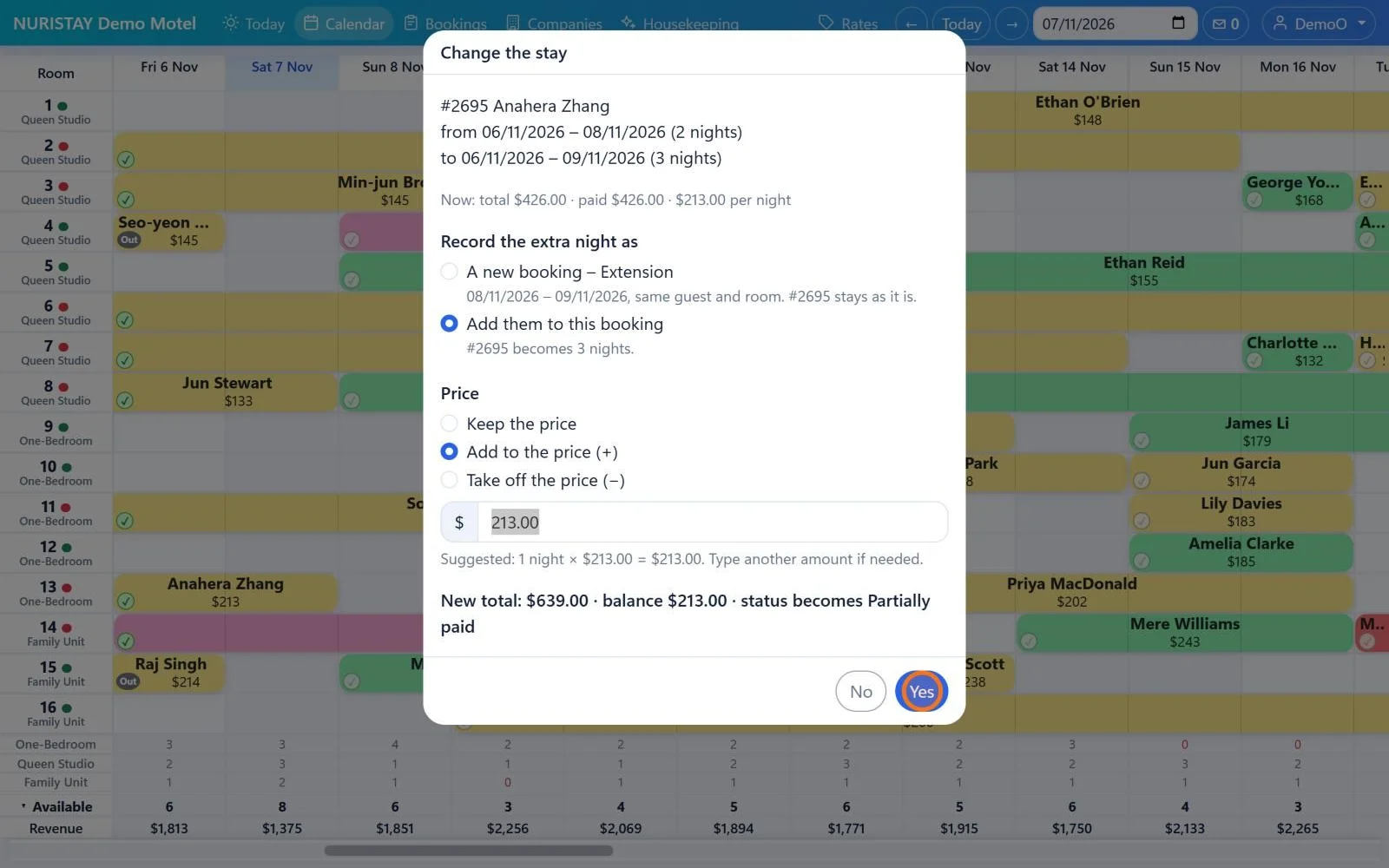

Moving picture: drag the right end one night longer – NURISTAY suggests +$213, and the stay becomes 3 nights and $639. Drag it back and the $213 comes off again.
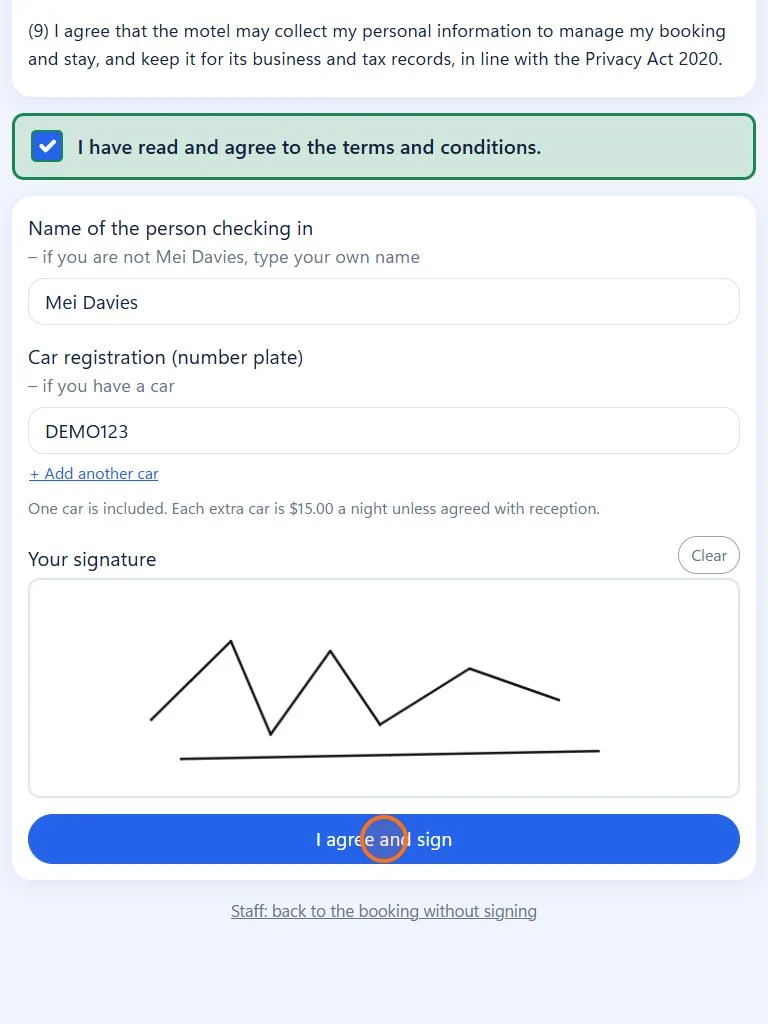

Check-in – quick, and no paper
Guests check in online before they arrive, or sign the check-in form on your tablet at reception. Everything is saved with the booking in the cloud – nothing to print or file.
- Online check-in before arrival
Email or text the guest a link. They confirm their details, add photos of their ID and card if you ask, and sign on their own phone.
- Sign on a tablet at reception
Press Sign and hand over the tablet: a guest screen in large text, with no menu. The guest ticks the terms, adds their car and signs with a finger – from the check-in day this also checks them in.
- Paperless – kept in the cloud
Signed check-in and security deposit forms are saved with the booking and kept for 7 years. ID and card photos are encrypted and deleted 7 days after check-out.
All you need is the internet
NURISTAY runs in the web browser, so you can use it on any computer, tablet or phone, anytime and anywhere – at the front desk, around the property or on holiday. Choose a device to see the same screens on it.
Two weeks of rooms on the calendar, with bookings opening beside it in the Side Panel. Install it from Edge or Chrome and it opens in its own window, with its own icon.
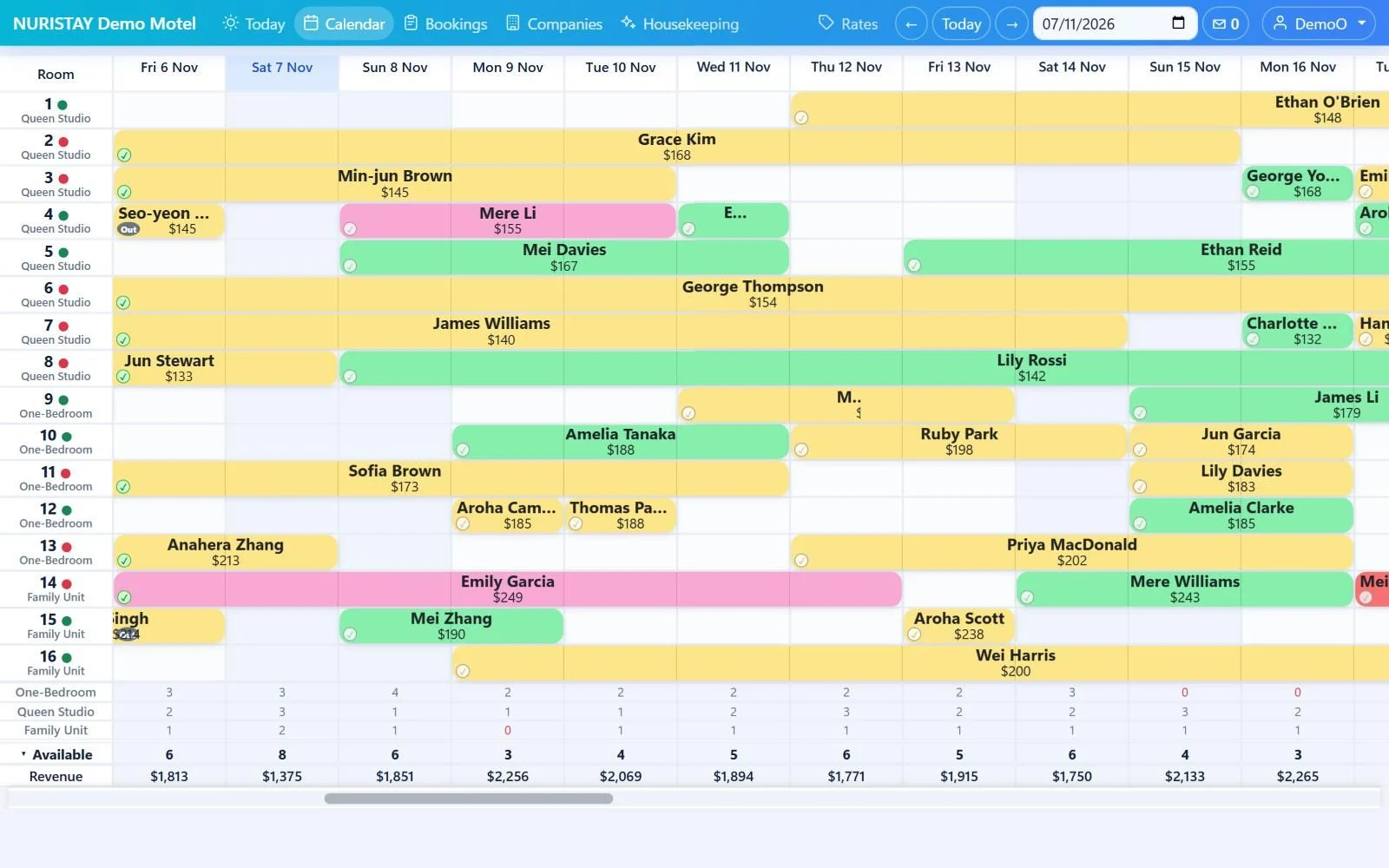
Real screens from NURISTAY Demo Motel, with made-up bookings. Each screen scrolls by itself to show the whole page – scroll it yourself to look around.
- Nothing to install
Open it in the web browser on a PC, laptop, iPhone, iPad or Android device. New versions arrive by themselves.
- Everyone sees the same
Screens refresh by themselves, so a room a cleaner finishes shows at the front desk within 15 seconds.
- Safe from anywhere
Everyone has their own login: a password, then a PIN. Your own phone or PC can remember you for 30 days.
- Kept in New Zealand
Your data is stored in New Zealand and backed up automatically. Owners can restore their property from a backup.
Why accommodation owners choose NURISTAY
Less typing, fewer clicks, nothing missed. Built at a working motel, for the way the front desk really works.
Booking emails become bookings
Forward Booking.com, Expedia and SiteMinder emails and the booking is made for you – changes and cancellations too.
Guest emails send themselves
Pre-arrival, payment reminder and thank-you emails go out on time from your own email address.
Prices that follow the market
See what the 20 cheapest places to stay nearby charge each night, with price suggestions for the next 120 days.
Office Add-onDirect bookings, 0% commission
Guests book and confirm on your own booking page, with no commission to pay.
Your whole team on one screen
Housekeepers update rooms on their phones and the front desk sees it straight away.
From timesheets to payslips
Staff hours are recorded as they work, and payslips and IRD filing are made from them.
Office Add-onSimple pricing by number of rooms
Every plan has every feature, including your online booking page and channel manager. Pay month by month, or for 12 months at once and save 12%. Your first month is free.
20+ years of running a family motel, in one product
Our family has run a motel in New Zealand for more than 20 years. Every frustration we met – retyping booking emails, paper forms, chasing payments – we fixed ourselves with our IT background while running the motel: from a notebook at the front desk to a spreadsheet, a desktop app and now a cloud service.
New updates every week See release notes →
Made for New Zealand
- NZ dollars, GST and tax invoices
- New Zealand public holidays and Pacific/Auckland time
- Payroll rules and IRD filing for your staff (Office Add-on)
- Your data stored in New Zealand
Questions owners ask
Do I need to install anything?
No. NURISTAY runs in the web browser on any computer, tablet or phone. You can also install it from Edge or Chrome, or add it to your phone’s home screen, so it opens like an app.
Who sets up my property?
We do. We create your property, rooms and owner login for you. The owner then adds a login for each staff member, and everyone signs in with a password and then a PIN.
Can I bring my existing bookings?
Yes. Import them from an Excel or .csv file exported from your old system, or fill in our blank template. An import can be undone for 7 days.
Does it work with Booking.com and Expedia?
Yes. Forward their booking emails and they become bookings by themselves within minutes – changes and cancellations too. The channel manager keeps your availability and rates in step with your booking channels.
Is my data safe?
Your data is stored in New Zealand. Everyone on your team signs in with a password and then a PIN, and guest ID and card photos are encrypted and deleted 7 days after check-out.
How much does it cost?
Plans go by the number of rooms, from $99 a month + GST, with every feature included. Pay for 12 months at once and save 12%. The Office Add-on is $49 a month + GST. Your first month is free.
Is the app in Korean or Chinese?
This website is in English, Korean and Chinese. The app screens are currently in English.
See how NURISTAY fits your property
Tell us about your property and we will show you around. The demo is free, with no obligation.